77JL registration takes three fields, then you add your email

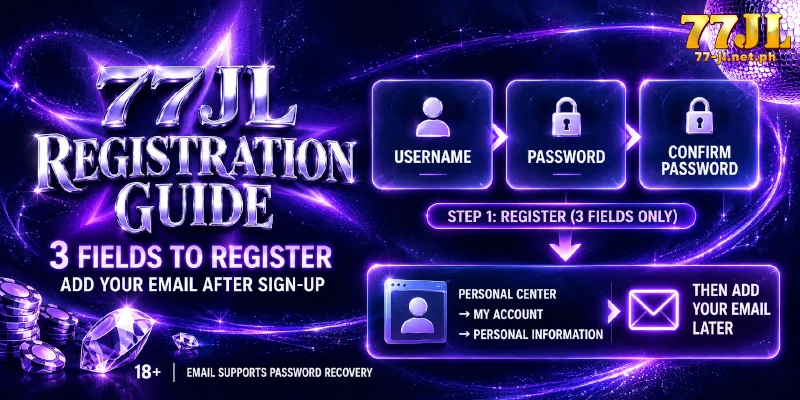
77JL registration takes three fields, and none of them is an email address, a phone number or a full name. That keeps the form short, yet the password recovery form then has nothing to check until you add an email in Personal Information. Step five is that email, and without an email a forgotten password goes to Customer Services.
What to have ready: 18+ and an email you can open
You need to be 18 or older and hold an email address you can open today, and you need nothing else to start. The age line is 18+, the figure printed in the footer of the site, and the form asks for no birth date.
The email belongs to step five, not to the form, so a mailbox you can open today is the only preparation that matters. An address you can no longer open is no better than none.
Register at 77JL in five steps, the last after the form closes
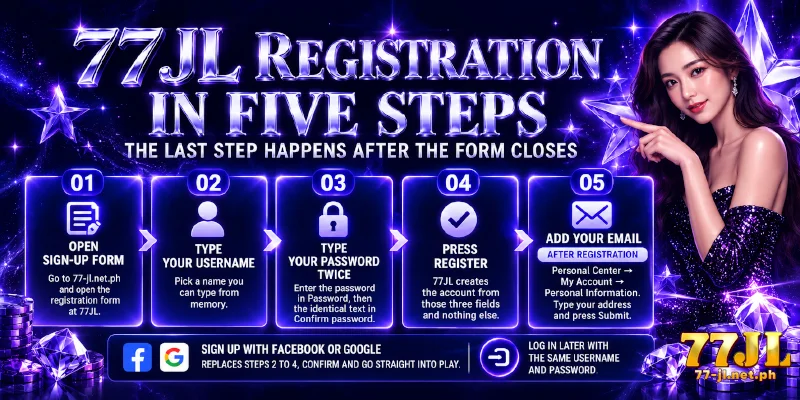
Registration at 77JL follows the order the screens appear, and the last step happens after the form closes.
- Open the sign-up form. Go to 77-jl.net.ph and open the registration form at 77JL. The form shows three fields: Username, Password and Confirm password.
- Type your Username. This is the name you log in with, so pick one you can type from memory.
- Type your Password twice. Enter the password in Password, then the identical text in Confirm password. This becomes your login password.
- Press Register. 77JL creates the account from those three fields and nothing else.
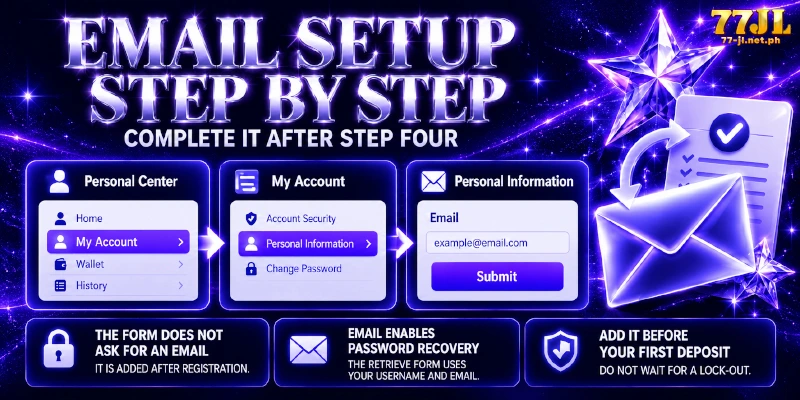
- Add your email. Open Personal Center, go to My Account, open Personal Information, type your address into the Email field and press Submit. After you submit, the address is on file for the recovery form.
77JL sign up through Facebook or Google replaces steps two to four: a platform popup opens, you confirm there, and you go straight into play. Either way, you return later with the same Username and Password to log in.
The form never asks for an email, so step five adds one
Add your email right after step four: the Retrieve form, the password recovery form, asks for your Username and your Email, and the email must already be stored on the account. The form never asks for one, which is the gap step five closes.
A member with no email on file cannot recover a forgotten password and goes to Customer Services instead.
Add the address before your first deposit, not after your first lock-out: the form never collected an address, and the recovery form cannot work without one.
Only two of the five security items fill on day one
Step five of registration at 77JL also starts a second job. 77JL registration puts every account on a score across five security items, and a new account starts at Low with 0 points.
Two of the five are within reach on day one: your Personal Information and your login password. The other three wait for your first withdrawal account, which is a bank account or an e-wallet, meaning a mobile money account such as GCash or Maya.
Fifth on the list, the Transaction Password is a second credential, separate from your login password, that every action moving money requires.
Reading down the table gives the five items in the order you can act on each, and what each one does.
| Item | What the item does | When you can complete the item |
|---|---|---|
| Personal Information | Holds the Email field that recovery reads | Today, with step five |
| Login password | Opens the account | Step three, already done |
| Bank Account | Receives withdrawals, with the name checked against the member account | When you bind your first withdrawal account |
| Link E-wallet | Receives withdrawals on GCash or Maya, with the same name check | When you bind an e-wallet |
| Transaction Password | Authorises every money action | When you bind your first withdrawal account |
Low is the starting rating right after registration, not a fault: three of the five items depend on a withdrawal account, and a new account has none yet.
FAQ
Four questions come up around a three-field form.
Does 77JL registration ask for ID documents?
Not at any stage. The form involves no document upload, so no KYC step, meaning identity-document verification, applies at registration or later. The five security items are the account’s protection instead.
Does registration at 77JL send a verification code?
No code is sent. The form collects no phone number or email, so a one-time password (OTP, a code sent by SMS or email) has nowhere to go, and no two-factor authentication (2FA), a second check after your password, exists either. Your login password and, later, your Transaction Password do that job.
Do I have to deposit before I register at 77JL?
No. The form has three fields and no payment step, so you register first and deposit when you choose to. When you do, the minimum is ₱100 on every method.
Which name does registration at 77JL need to match?
None, because 77JL registration asks for no name. The name check comes later, when you bind a payout destination: the name on the account you bind has to match the name on the member account, or the withdrawal fails.
Three fields open the account, and step five keeps the password recoverable
Three fields keep the form short, and the cost lands after the form closes. A 77JL registration therefore ends at step five, the email stored in Personal Information. With that address on file, the account is ready for a first deposit.