77JL login needs no email, but recovering a password does

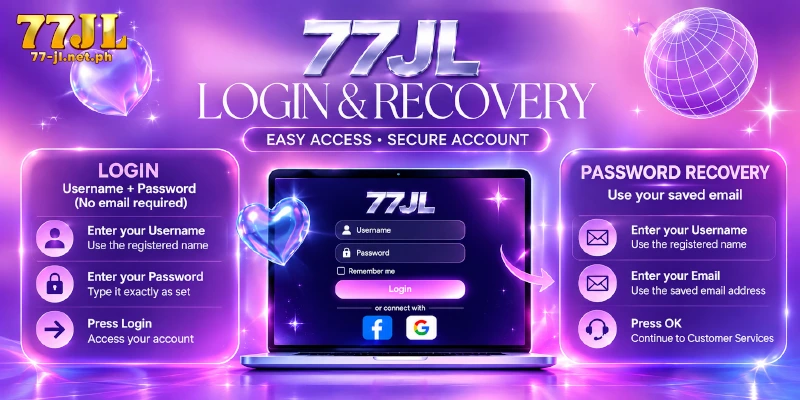
77JL login works with a Username and a Password, or through the Facebook and Google buttons on the same form, and a page that asks for more at that point is the signal to stop. Password recovery is the one place an email enters, through the Retrieve form, and that form can check only an address you saved in Personal Information beforehand.
77JL login takes a Username and a Password
Login at 77JL means a Username, a Password and the Login button, and the top bar confirms the result.
- Open the login form. Type 77-jl.net.ph into your browser, then open the login form; two fields, Username and Password, appear.
- Type your Username. Fill the Username field with the name you registered, spelled the same way.
- Type your Password. Enter the Password exactly as set at registration. The Remember option sits on the same form, so leave Remember unticked on any phone or computer that other people use.
- Press Login. Login at 77JL is complete when the top bar shows Deposit, Withdrawal, your balance and your avatar.
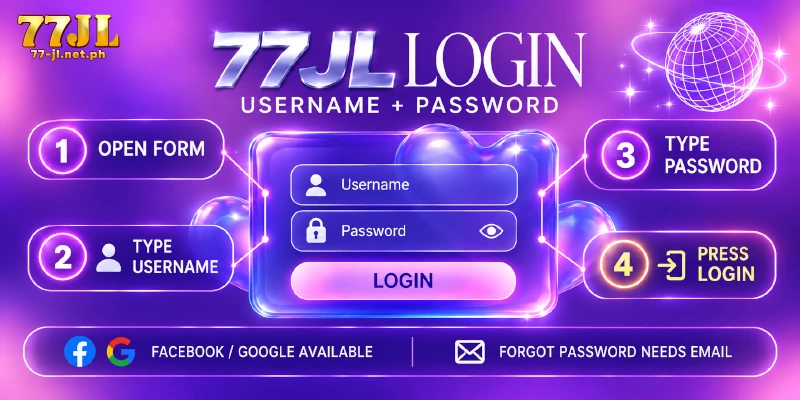
Facebook and Google also work for login at 77JL, under the words or connect with, and those buttons sign you in through the platform instead. The app is a separate install, which the app download guide covers. Everything below about the Retrieve form concerns the Username and Password route.
When the form rejects your login, the password is not yet lost. Retype both entries and check the Password for a typo first, because Forgot Password helps only when an email is on file.
The login form never asks for the Transaction Password
A 77JL login form has five working parts: a Username field, a Password field, a Remember checkbox, a Forgot Password link and the Login button, with Register beside the button. Nothing on that form asks for an email, a phone number, a card number or a Transaction Password.
Money actions use a separate secret, the Transaction Password, which differs from the Password you type at login. The account asks for the credential only when money moves, so the Transaction Password sits inside the account and outside the form.
Sorted by where each appears and what each one covers, the table shows the two credentials.
| Credential | Where the credential appears | What the credential opens |
|---|---|---|
| Username and Password | The login form | The account itself |
| Transaction Password | Fund-related actions inside the account | Money actions, set while binding your first withdrawal account |
Any page that asks for the Transaction Password while you are still on the 77JL login form has the order backwards, so close that page and type the address of the 77JL official site yourself.
A forgotten password goes through the Retrieve form
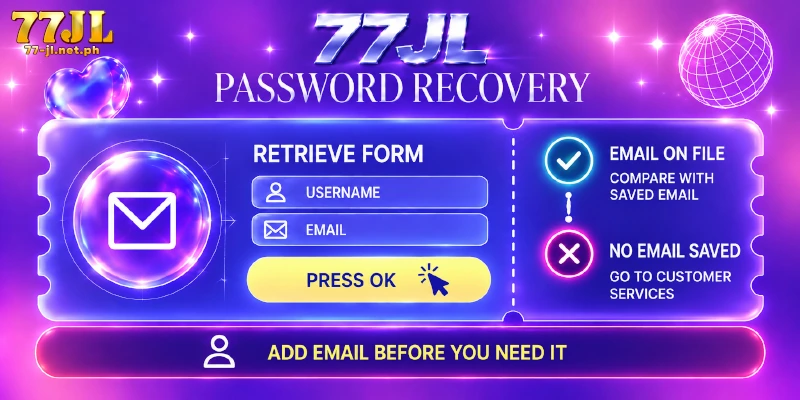
Press Forgot Password on the 77JL login form to reach the Retrieve form. A 77JL forgot password request starts with two entries, Username first and then Email, and the address must match the one stored on the account.
Press OK and the form hands you to Customer Services, the support desk behind the site. The stored address is the one saved in Personal Information, found under My Account in Personal Center, so an address you never saved gives the form nothing to compare.
Whether an email is on file splits recovery into two cases, shown in the table.
| Email on file | What the Retrieve form can do | Your next move |
|---|---|---|
| Yes, saved in Personal Information | Compare the Email you type with the saved one | Enter Username and Email, press OK, then continue to Customer Services |
| No, never added | Nothing to compare | Go to Customer Services directly |
Add the email in Personal Information before the day you need the address: the Retrieve form reads only the email stored on the account, and Personal Information sits inside the account, so a locked-out member cannot add the address afterwards.
Changing the password inside the account needs the current one
Members who remember the password change the password for login at 77JL inside the account: reach My Account through Personal Center, open Login password, fill Current Password, New Password and Confirm Password, then press Submit. That form asks for the current password, so a member who forgot the password goes through Retrieve instead.
Check Last Login Time and IP when the account feels off
My Account lists the Last Login Time, then the Last Login IP, for your last login at 77JL. The time is the faster check, because you know whether you were online then.
Your IP is the network address your connection shows the site. The IP helps only if you know your own, and the address changes when you move between home Wi-Fi and mobile data.
If neither record matches your own, treat the login account at 77JL as exposed and tell Customer Services before you do anything else with the account. The Transaction Password still guards every fund-related action, so someone holding only your login password meets a second credential when money moves.
FAQ
Three questions come up around the login form.
Can I use GCash for login at 77JL?
No. Login at 77JL takes a Username and a Password, or a Facebook or Google connection, and GCash does not sign you in. GCash is a payment channel inside the account, used to deposit and, once the wallet is bound, to withdraw.
Does My Account show pending deposits and withdrawals?
Yes. My Account shows the count of pending deposits and the count of pending withdrawals, so you can see at a glance whether a transaction is still waiting.
Does 77JL login ask for a code by SMS or email?
No. The form takes a Username and a Password and sends no code, and no step follows the password at login. The only second credential, the Transaction Password, waits inside the account for money actions.
What does Personal Information hold besides the email?
Personal Information holds a Nickname of 1 to 255 characters, a Google entry and the Email, which also takes 1 to 255 characters. Only the Email feeds the Retrieve form, so the other two change nothing about recovery.
Two entries log you in, and My Account shows what happened
Login at 77JL asks little, and that is the check: two entries or one social connection, with the Transaction Password waiting inside the account for money actions. After you sign in, My Account is where to confirm the Last Login Time and an email address saved in Personal Information.