77JL APK download: dismiss Chrome’s warning on Android, install a profile on iPhone

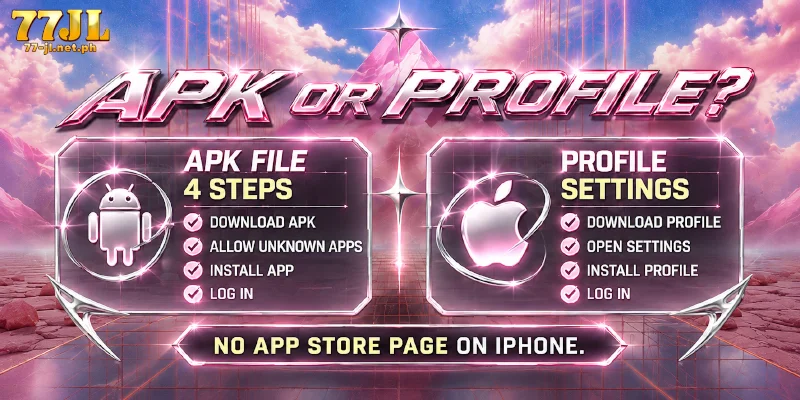
The 77JL APK downloads from the site as a file, so Chrome shows a File might be harmful warning, and that warning is expected. An iPhone has no App Store page for the app; the app installs there as a profile from Settings. Step 3 below tells you what to tap on that warning, and the iPhone steps follow the Settings route.
Which route fits your phone: Android file or iPhone profile?
The app comes in two forms: Android installs a file, the APK that 77JL serves from its site, while an iPhone installs a profile. An APK is the installer file format Android apps use, and a Web Clip profile is a configuration file signed with an Apple Developer certificate, so neither route passes through a store.
Sorted by what you download and the screen to expect, the two routes look like this.
| Phone | What you download | Screen to expect |
|---|---|---|
| Android | The APK for 77JL, from the site | Chrome’s File might be harmful warning |
| iPhone | A profile, not an App Store app | Profile Downloaded in Settings |
Install the 77JL APK in four steps, tapping Download anyway at step 3
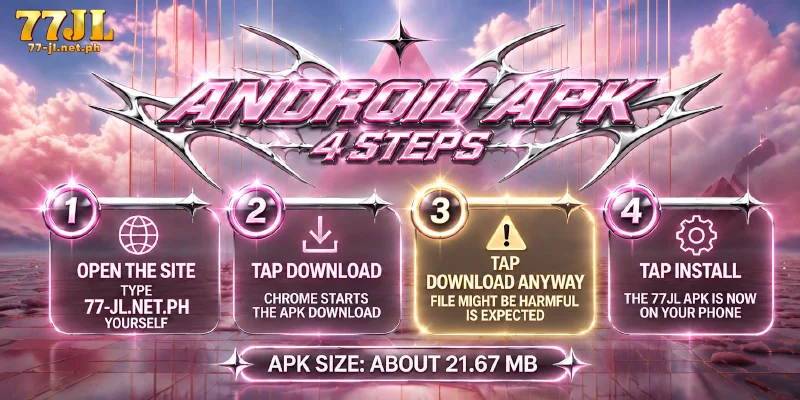
Four steps install the APK for 77JL, and Chrome tries to stop you at step 3.
- Open the site. Type 77-jl.net.ph into the Chrome address bar yourself and open the page.
- Tap Download. Chrome answers with a warning instead of a plain download.
- Read the warning and tap Download anyway. Chrome says File might be harmful, and Download anyway lets that one file through. The file is the APK for 77JL.
- Tap Install. Once the APK at 77JL finishes installing, the app is on your phone.
Chrome shows the File might be harmful warning for any APK from outside a store, so the warning cannot tell you whether the APK for 77JL is the real one. The address you entered in step 1 can, which is why you type the address rather than follow a shared link.
On iPhone, the profile goes in through Settings, not the App Store
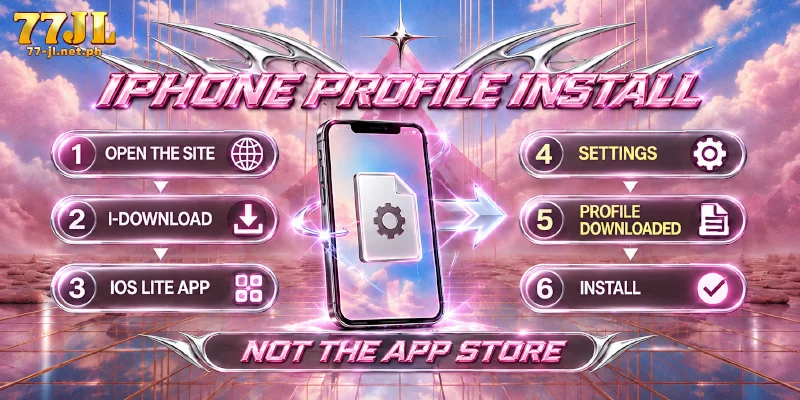
An iPhone installs the app as a profile, so no App Store page exists to search for, and no APK for 77JL exists to download. iOS keeps profile approval in Settings so that you, and not a web page, decide whether a profile goes on the phone.
- Open the site. On your iPhone, type the site address in the browser, as on Android.
- Tap I-Download. This starts the iPhone route.
- Install IOS LITE APP. The screen that follows offers IOS LITE APP, and you install that app.
- Open Settings and find Profile Downloaded. iOS lists the downloaded profile there.
- Tap Install and confirm. After you confirm, the profile is installed.
A phone that shows Profile Downloaded in Settings has finished the download half, so only the Install and the confirmation remain, and neither happens in the App Store.
What the app adds after you log in: Poker, Lottery and the ₱88 bonus
Inside the casino app, nine categories make up the menu: Hot, Slots, Live, Fishing, Sports, Esports, Sabong, Poker and Lottery. The web version has no Poker or Lottery, so a member who wants either plays the game in the app.
Beyond the menu, the App Download Bonus pays ₱88 once you install the app, log in on the app, deposit ₱1,000 or more and place Slot bets of ₱5,000 or more.
Installing and logging in take no deposit, so log in with your account once either install finishes, registering first if you are new, with three fields and no email or phone. The deposit and the bets are the amounts to plan around, and the table lists the terms and what each one means for you.
| Term | What the terms say | Meaning for you |
|---|---|---|
| Steps to complete | Install, log in on the app, deposit ₱1,000 or more, place Slot bets of ₱5,000 or more | The deposit and the bets are the costly two |
| Wagering requirement | 1x, Slot only | The betting you owe before a withdrawal is 1x, counted on Slot only |
| Voucher and limit | 30 days, one per member | The voucher is good for 30 days, and each member gets one |
Qualifying for the ₱88 takes a ₱1,000 deposit and ₱5,000 of Slot bets, so the bonus fits a member who would play that much Slot anyway, and the bonus is no reason to start.
FAQ
Two details sit outside the steps: the size of the 77JL APK download, and how the bonus treats members who share a network.
How large is the 77JL APK?
At about 21.67 MB, the APK at 77JL is the file you accept in step 3. The figure belongs to the Android file only.
Does sharing a network or a phone affect the App Download Bonus?
Under the bonus terms, a shared IP or an identical device counts as a reason for losing the bonus. An IP address identifies your connection to the site, and phones on one home Wi-Fi present the same address, so the rule is worth reading before two members on one network each claim.
Chrome’s warning is normal; the address you typed is the check
Neither route goes through a store, so each phone asks you to approve a source: Android with a warning you dismiss before the 77JL APK installs, iPhone with a profile you confirm in Settings. Both approvals trust the address you started from, so the address you typed is the check that matters.